Responsible play and in-app spending
Published 22 September 2026. Last reviewed 22 September 2026. Responsible editor: Richard Wright.
Games funded by randomised in-app purchases are designed to be played indefinitely and to make spending easy at the moment you most want to spend. That is not an accusation of wrongdoing; it is simply how the business model works. This page is the practical counterweight: what you can actually switch on before you need it.
We publish it because we carry advertising for a game of exactly this type, and it would be dishonest to take the advertising and leave this part out.
1. Set the limit before you open the shop
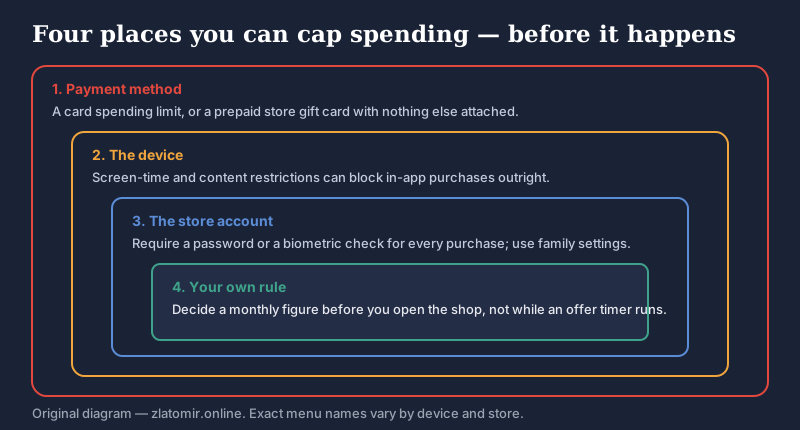
Decide a monthly figure — including zero — while you are not in the game. Offers in games of this kind are routinely presented with a countdown, and a countdown exists to stop you thinking. A decision made before the timer starts is a decision; one made during it usually is not.
2. Turn off one-tap purchasing
Both major stores can require authentication for every single purchase rather than remembering you for a window of time. On iOS this is under Settings › [your name] › Media & Purchases › Password Settings; on Android it is in the Google Play app under Settings › Authentication › Require authentication for purchases. Exact wording changes between versions; look for “require password” or “require authentication”.
3. Restrict purchases at the device level
On iOS, Screen Time › Content & Privacy Restrictions › iTunes & App Store Purchases can set in-app purchases to “Don't Allow”. On Android, Google Play's Parental controls and Family Link provide the equivalent. These are the controls that matter if a child is playing — not anything inside the game.
4. Cap the payment method
The most reliable limit is the one the game cannot reach. A prepaid store gift card with a fixed balance, or a card with a low spending limit and nothing else attached to it, puts a hard ceiling on the whole question. If you find yourself topping it up early, that is information worth noticing.
5. Know how subscriptions and passes actually end
Recurring passes and subscriptions bought through an app store are cancelled in your store account, not in the game, and not by deleting the app. On iOS: Settings › [your name] › Subscriptions. On Android: Google Play › Payments & subscriptions › Subscriptions. Deleting the game while a subscription is live keeps charging you.
6. Refunds: what is realistic
Two separate things get confused here.
- Store policy. Apple and Google both operate discretionary refund processes with short windows. This is usually the fastest route, particularly for an accidental purchase or a purchase made by a child. Ask promptly.
- Statutory rights. In the EU, the 14-day right of withdrawal for digital content is generally lost once delivery begins with your express consent and acknowledgement — which is what happens when in-game currency is credited instantly. Your rights against a trader for content that is faulty or not as described are separate and still apply.
If a purchase was misleading rather than merely regretted, your national consumer authority is the right place to raise it.
7. Warning signs worth taking seriously
None of these makes anyone an addict, and we are not qualified to diagnose anything. They are simply the patterns worth noticing in yourself or someone else:
- Spending more than intended, repeatedly, and rounding it down when describing it.
- Buying to recover from a bad outcome — a disappointing summon, a lost rank — rather than by plan.
- Hiding purchases, or the amount, from people you live with.
- Money for the game coming out of things it should not.
- Distress when unable to play, or when a daily streak or event is missed.
- Playing to the detriment of sleep, work, school or relationships.
8. Where to get help
If gaming or in-game spending has stopped feeling voluntary, help exists and it is free.
- Your doctor is a reasonable first step, and gaming disorder is a recognised condition in the World Health Organization's ICD-11 classification.
- National gambling and gaming helplines exist in most EU member states, usually free and confidential, and generally cover in-game spending as well as betting.
- Your national consumer authority handles misleading commercial practices; in the Czech Republic that is the Czech Trade Inspection Authority, coi.cz. General EU consumer information is at the European Commission.
- PEGI explains what an age rating and its content descriptors mean: pegi.info.
We are a publisher, not a clinical or advisory service. Nothing on this page is medical, legal or financial advice, and we cannot intervene with a game publisher, a store or a bank on your behalf.
Written by Richard Wright for Branch line 005 s.r.o.. Last reviewed 22 September 2026.